
#Requirements
A requirement is one line of your specification: "the discount is visible before payment", "a replayed webhook never charges twice". Each one is verified by the acceptance criteria of use cases, or by a measure from your app, and ships in a release.
Requirements are part of the Requirements option of the Plan capability. See Personas for turning it on.
#The Requirements tab
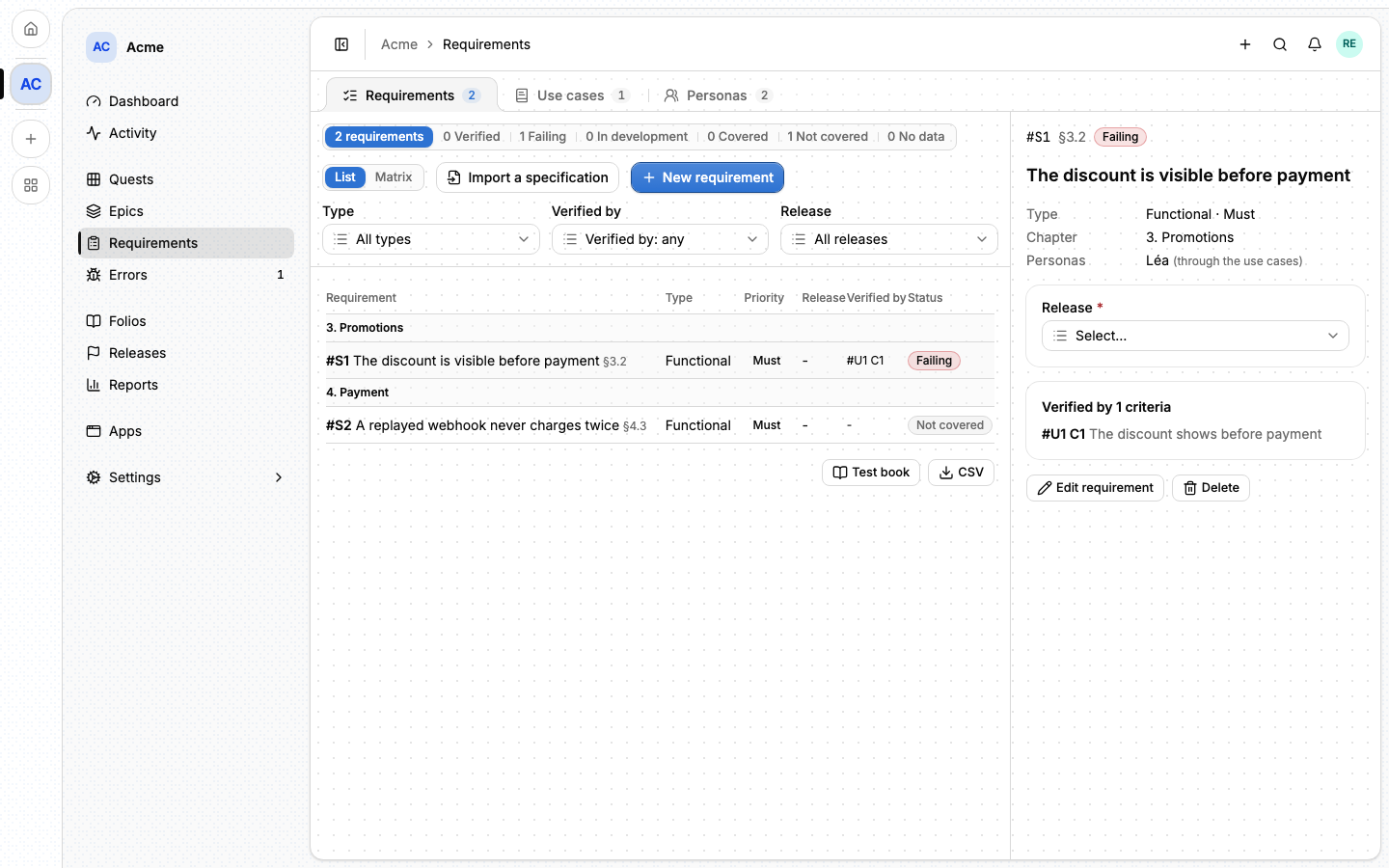
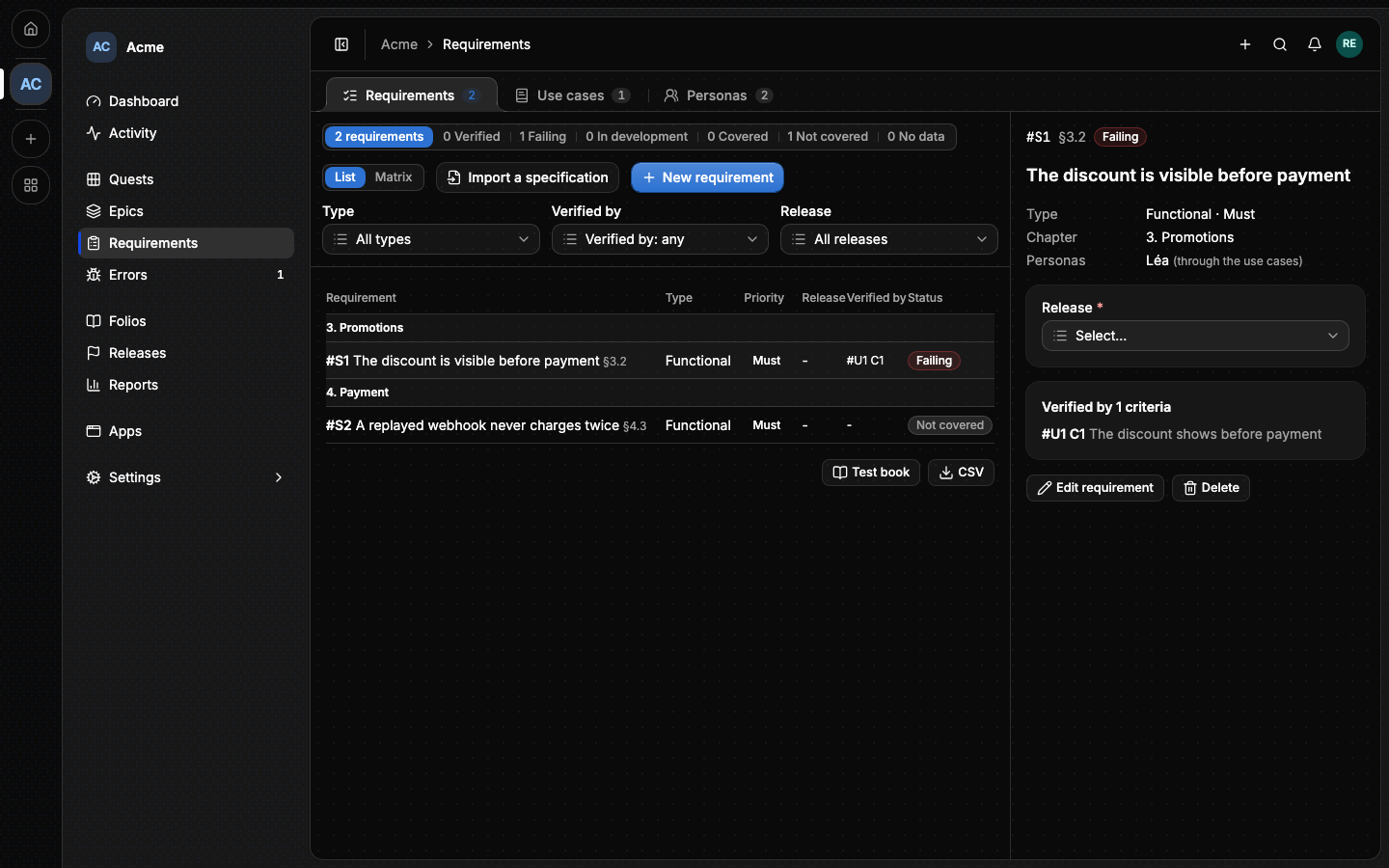
The Requirements tab lists every requirement, numbered #S1, #S2 and so
on, grouped by chapter. The counters at the top filter by status; below them,
Type, Verified by and Release narrow the list further.
| Status | Means |
|---|---|
| Verified | Every criterion verifying it passed on its use case's last run. |
| Failing | A criterion failed, and every quest of the epics covering its use case is done. |
| In development | A criterion failed while those quests are still open. |
| Covered | Criteria verify it, and none has run yet. |
| Not covered | Nothing verifies it. |
| No data | A measure verifies it and has no point yet. |
New requirement opens the form: its Statement in one sentence, its Type (Functional, Non-functional or Constraint), its MoSCoW Priority (Must, Should, Could, Won't), and its Chapter and Paragraph as the specification numbers them.
#The detail pane
Clicking a requirement opens its pane: the epics covering it, the personas behind it (through its use cases), its release, and the criteria verifying it. A criterion is linked to a requirement from the use case.
Release is filled from the epics covering it: when one of them sits in a release, the requirement ships there (auto). Changing it moves those epics too, after a confirmation that names them. With no covering epic in a release, it is set by hand.
#A requirement from a folio
A requirement can name the folio it comes from, and the heading of its section. When that section changes, the requirement shows Source changed and the pane shows what changed. Update the requirement takes the new text, Keep dismisses the change. Import a specification opens the Verify dialog with a prompt that splits a folio into requirements.
#Verified by a measure
A non-functional requirement is verified by a measure rather than a use case. In the form, Verified by offers A web vital, A monitor's availability and A monitor's latency:
- a web vital (LCP, INP or CLS) at a percentile, for a path pattern of the
app's sigil (
/checkout/*); - the availability of a monitor, in percent;
- the latency of a monitor, at a percentile.
Each is read on an app copy (production by default), against a threshold, over a window (7 days by default). Lore evaluates every measure once an hour and when you save it, and the pane shows the value, since when it holds, and the last 14 days. A vital needs Ship's Track option, a monitor needs Uptime; without them, or without a point in the window, the requirement shows No data. These measures need an app built with Alepha, whose sigil and monitors report them.
#From the command line
lore requirement list --project acme
lore requirement create --statement "The discount is visible before payment" --priority must
lore criterion link --usecase U7 --key C2 --requirement S5
lore requirement set release S5 --release 2.4.0
lore requirement update S15 --metric-kind latency --metric-threshold 300
See The lore CLI.
#From an agent
An agent works with requirement_list, requirement_get,
requirement_create, requirement_update, requirement_delete,
requirement_set_release and criterion_verify_link. requirement_update
takes a measure through its metric_* parameters. A requirement is
referenced as [[#S5]]. The full list is in
MCP tools.
#Next
- Verify and runs: turning criteria into results.
- Traceability: what is covered, and what a release is ready to ship.