
#Releases
A release is a named goal that holds the work due to ship in it: 0.28.0,
demo-1, v1.0.0-rc.1. It answers "what is in this version" while the work is
going on, and keeps a changelog of what shipped once it is published.
Releases are the Releases option of the Plan and track work capability: see Capabilities. Creating, publishing and deleting them needs a rank that may manage releases, which the owner has and a plain Member does not by default (see Members).
#The releases page
Releases in the sidebar lists every release of the project, with its state, its tag, its progress and its date. Click a row to open the release.
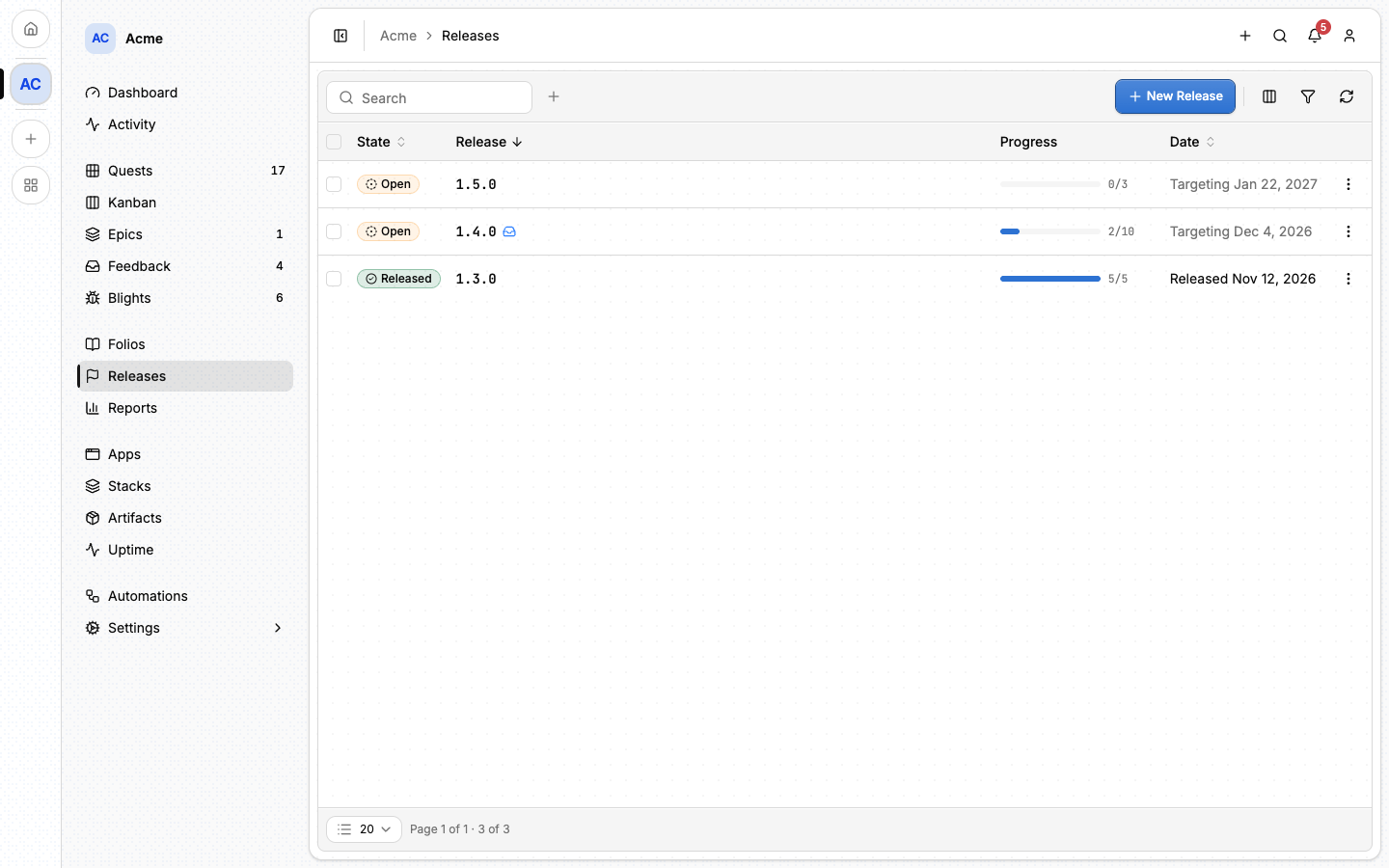
A release has exactly two states. It is Open until it is published, and Released afterwards. The State filter keeps one or the other.
Several releases are open at once, and that is the normal case: 0.28.0,
1.0.0 and 1.1.0 coexist, and a hotfix is a new release created beside the
one it patches. Nothing limits you to one open release, and nothing about a
release pauses.
#Creating a release
- On Releases, click New Release.
- Type its Tag: its name and its address, so keep it short (
0.1.0,demo-1). - Click Create.
On the release's page, Edit adds a Title, a Target date and a Description. The target date is an estimate: nothing enforces it.
⚠️ Changing a release's tag moves its URL, so links already shared stop working, and artifacts built against the old tag drop off the release. The title is safe to change at any time.
#Creating the next version
A row's menu can offer to create the version that follows it, labelled with the tag it would create: Create 0.31.0. It opens the same dialog with that tag filled in, and nothing exists until you confirm.
A row offers a version only when it is the highest release of its line:
- the next major from the highest release in the project;
- the next minor from the highest release within its major;
- the next patch from the highest release within its
major.minor, and only once that release is published: a patch of something that has not shipped means nothing.
Whether a release is open or published decides nothing else. With 0.28.0 and
0.29.0 published, and 0.30.0 and 1.0.0 open, the rows offer:
| Row | Offers |
|---|---|
0.28.0 |
0.28.1 |
0.29.0 |
0.29.1 |
0.30.0 |
0.31.0 |
1.0.0 |
1.1.0, 2.0.0 |
Publishing 0.30.0 adds 0.30.1 to its row and leaves 0.31.0 where it is: a
far-future release planned early never stops the current line from moving.
The new tag keeps the row's v (v1.0.0 offers v1.1.0), and a short tag is
completed to three numbers (1.0 offers 1.1.0).
A tag that is not a version offers nothing, and blocks nothing. demo-1 gets
no entry, and it does not take the next major away from 1.0.0, even though
the table sorts it after every version. A tag of four numbers or more, such as
2026.9.13.1, is left out the same way.
#Putting work in a release
Two things go in a release: epics and quests. Nothing is in a release
because it happened to be finished while the release was open. An epic or a
quest is in 0.28.0 because somebody put it there.
You attach from the work itself:
- an epic, with the Release row of its side panel;
- a quest, with the Release row of its side rail, or the Release field of its form;
- several quests or epics at once, by ticking rows on the Quests or Epics page and choosing Add to release.
The release's Contents tab lists what is in it, and Remove takes an item out.
A quest can name a release itself, or follow its epic's:
- A quest that names no release, inside an epic that ships in
1.0.0, is in1.0.0. Leaving it blank is what lets it follow its epic. - A quest that names
0.28.0, inside that same epic, is in0.28.0. Its own release wins over its epic's, and that is a real case rather than an error: a piece of a larger initiative can ship early.
When an epic gains a release, every quest of it that named none moves with it. The ones that named their own keep it.
#The release page
A release's page shows its tag, its state, its progress and its target date, above five tabs:
- Overview: its description and where it stands.
- Contents: the epics and quests in it.
- Flow: its epics and their quests, drawn in the order they depend on each other.
- Changelog: the completed quests attached to it, as Markdown. Copy it,
download it as
.md, or Save to Folios to keep it as a folio. - Artifacts: the builds pushed under the same tag (see Artifacts).
The progress bar counts the quests in four groups: done, in progress, not started and declined (shelved).
#Publishing
On an open release's page, Publish stamps the date, renders the changelog
and freezes the four progress counts onto the release. From that moment it is
drawn entirely from its own record: completing a quest a month later cannot
rewrite what 0.28.0 shipped.
⚠️ Publishing is one-way. Nothing can be attached to a published release or taken out of one.
Publishing also announces the release to the project's members, the publisher aside, in their inbox and by email (see Notifications).
Reopen is the single deliberate way back, for a release published by mistake. It clears everything publishing froze, and the release goes back to being computed from what it contains.
#The default release
A project may name one open release as its default: where a finished quest lands when nobody said where it should go. Set as default and Clear default are in a release's row menu and on its page, and the default wears a Default badge.
It is a fallback, not a plan. Everything can still be filed by hand, and a project with no default at all is a perfectly normal project. Creating a release never makes it the default, and Lore never picks one for a project that has none.
#What it catches
When a quest is completed:
- if it names a release, nothing happens;
- if it follows its epic's release, nothing happens;
- otherwise, if the project has a default and that default is still open, the quest lands in it, and the move is written in the quest's Discussion.
The middle rule is the one worth knowing. A quest with no release of its own
inside an epic that ships in 1.0.0 is already in 1.0.0. Putting it in the
default would quietly move it out of that release's changelog and progress.
#When an epic starts
An epic that names no release takes the default when it starts, which is the moment its first quest is accepted, and carries it down to every quest of it that named none. A quest that was given its own release while the epic was still a draft keeps it. Marking an epic ready attaches nothing: nothing has started yet.
An epic started before the project had a default never gets one. Its quests then land in the default one by one as they complete, and show on that release as loose quests while the epic itself is in none. Attach the epic to a release by hand to fix it.
#Publishing hands it on
Publishing the default release stops it being the default, since nothing can
be attached to a published release. The default then moves to the release
next in line: the lowest open release above the one you published whose
patch is 0. In practice that is the next minor, or the next major once no
minor is left:
Open when 0.29.0 (the default) is published |
The new default |
|---|---|
0.30.0, 1.0.0 |
0.30.0 |
1.0.0 |
1.0.0 |
0.29.1, 1.0.0 |
1.0.0 |
0.27.0, demo-2 |
none |
It never picks a patch or a prerelease (1.0.0-rc.1): a hotfix is filed by
hand, and catching loose work into it would put unrelated quests in its
changelog. It never moves backwards to an older release left open, and never
picks a tag that is not a version. When nothing qualifies, the project is left
with no default. The move is recorded in the new default's activity, naming
the release it came from.
Publishing any other release leaves the default where it is.
Reopening a release does not make it the default again. Reopening says the record was wrong, not that finished work should land there again.
#Deleting a release
A release is deleted from its row's menu, or several at once from a selection in the table.
⚠️ This cannot be undone, and nothing refuses it, published releases and the default included. What a delete costs:
- The epics and quests in it are detached, not deleted. They stay in the project, and afterwards name no release.
- A published release takes its record with it. Its changelog and the progress counts frozen when it was published exist nowhere else, and cannot be rebuilt once the release is gone.
- Deleting the default leaves the project with none. Unlike publishing, a delete hands the default to nobody: finished quests that name no release land nowhere until somebody sets a new default.
#From the command line
lore releases create --tag 0.31.0 --target-date 2026-12-01
lore releases attach --tag 0.31.0 --epic 22
lore releases publish --tag 0.31.0
lore releases check fails while the release still has unfinished quests,
which makes it a gate in a release script. See
The lore CLI for every command.
#From an agent
Release tools name a release by its tag. release_attach puts an epic or a
quest in one, release_changelog reads its changelog, and
release_set_default moves the default (omitting the tag clears it).
release_list and release_get say which release is the default, and
quest_complete says so when the default caught the quest.
The full list is in MCP tools.
#Next
- Epics: the plans a release ships.
- Artifacts: the builds pushed under a release's tag.
- Automations: append each published changelog to a folio.
- Reports: how a release is progressing.